|
<< Click to display Table of content >> Antenna parameters |
  
|
|
<< Click to display Table of content >> Antenna parameters |
|
Antenna parameters are used when creating an antenna, editing / creating a frequency band, creating a radiation diagram.
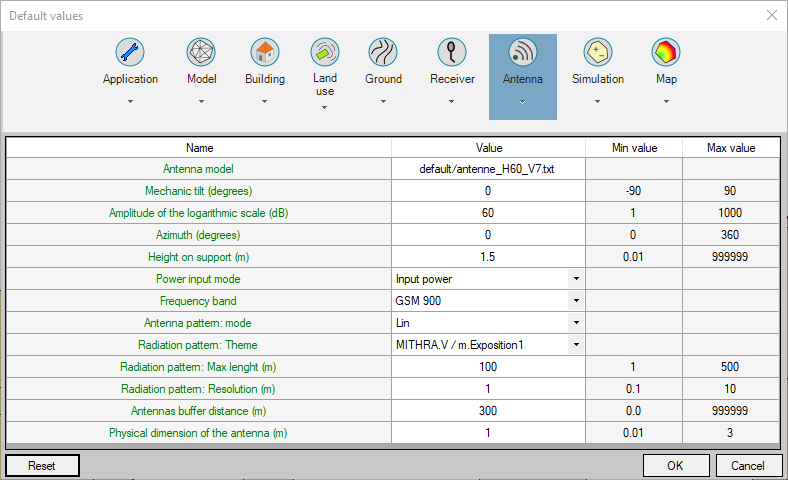
•Antenna model: default antenna model used when creating an antenna frequency band. The path is a relative path in relation to the directory "AntennaModels" located in the application directory.
•Mechanic tilt: default mechanic tilt when creating an antenna.
•Amplitude of the logarithmic scale: default amplitude used to draw the antenna frequency band diagrams.
•Azimuth: default azimuth when creating an antenna.
•Height on support: default height when creating an antenna in free field.
•Power input mode: default input mode when creating an antenna frequency band.
•Frequency band: default frequency band when creating an antenna frequency band. Are only listed the frequency bands available in the country.
•Antenna pattern: mode: default visualisation of the pattern in the transmitter interface. Choose between Log and Lin.
•Radiation diagram: Theme: default theme used to display a radiation diagram.
•Radiation diagram: Max lenght: total lenght of the pattern, pattern begins 25m behind the antenna.
•Radiation diagram: Resolution: resolution of the grid item created to display the radiation diagram.
•Antennas buffer distance: default value of the buffer when the function is called from an antenna.
•Physical dimension of the antenna: default dimension of the antenna during the creation.