|
<< Click to display Table of content >> Add a ground point |
  
|
|
<< Click to display Table of content >> Add a ground point |
|
•From the ribbon Model, click on the button  in the group Add items.
•The Point tool is now active. Design the geometry of the new object.
•The Ground point object box is displayed so that the parameters of the input point can be entered.
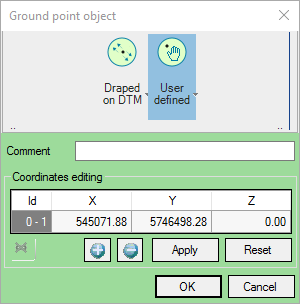
Ground point
•Selecting a Draping mode:
oDraped on DTM to drape the point created on the DTM.
oUser Defined to enter the coordinates (x,y,z).
•Enter a Comment if required.
•Click OK to confirm.
|
When creating ground points, the DTM is not recalculated automatically. Therefore, it is advisable to update the model after creating ground points. |
|---|
