|
<< Click to display Table of content >> Create MithraSIG object |
  
|
|
<< Click to display Table of content >> Create MithraSIG object |
|
From the ribbon Model, MithraSIG objects can be created by clicking on the corresponding buttons in the group Add items:
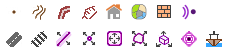
•A ground point. •A ground line. •A mound. •A bank. •A building. •A land use. •A receiver. |
•A wall. •A road source. •A railway source. •A point source. •A linear source. •A facade source. •A volumic source. |